
Why does my client’s video freeze during bilateral stimulation?
By Pure EMDR
Your client opens a bilateral stimulation (BLS) link during an EMDR telehealth session. They tell you they can see the dot. On your screen, their face is frozen. Some BLS tools ask clients to switch tabs or apps to see the board. On a phone, that switch can put the video call in the background and interrupt the camera feed.
What a frozen picture can hide during EMDR
During a quiet stretch of a set, a change in your client’s expression might prompt you to check in. If you’ve agreed that raising a hand means “pause,” you’re watching for that, too. When the video freezes, the last frame can look like a client sitting perfectly still, even as their expression changes or their hand goes up.
If it happens mid-set, pause the dot and tell your client what you see. Ask them to return to the call and give you a wave. Seeing their hand move tells you the picture is live again. It’s also a chance to ask, “What was happening for you just then?” EMDRIA discusses checking in about missed cues in its guidelines for virtual EMDR therapy.
How Pure EMDR keeps the client in the call
With Pure EMDR, you open the board on your computer and share it through your telehealth call. Your client sees the moving dot right in the appointment window. They can keep the call in front and their camera on while they watch. On your side, you can keep their video tile in view and control the dot with the Pure EMDR remote.
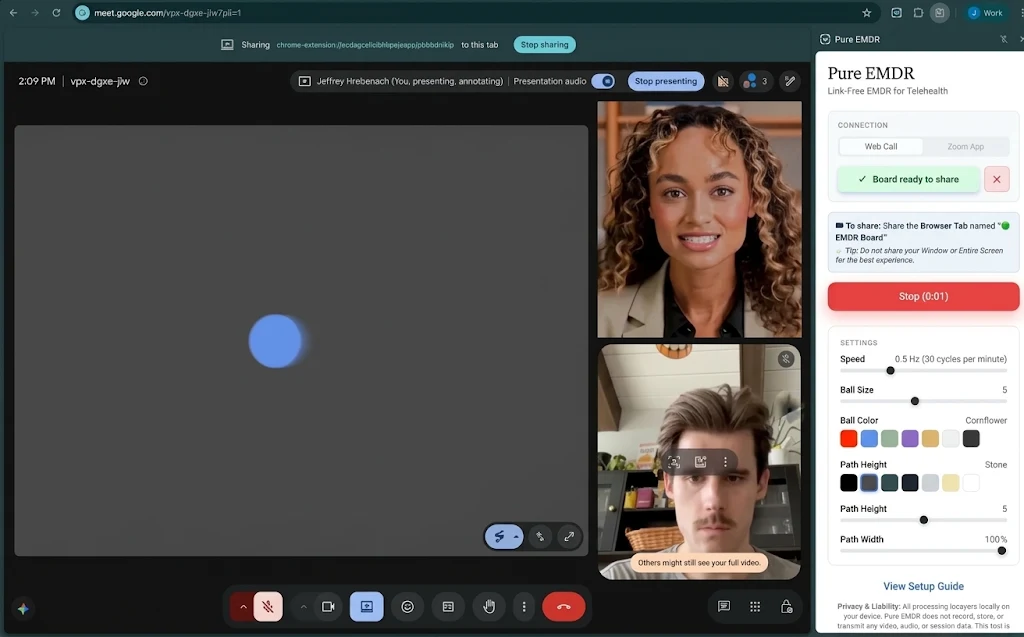
To try it on a practice call, open Pure EMDR in Chrome or Edge on your computer. For a browser-based call, use the call’s screen-sharing control to share just the EMDR Board tab. For Zoom desktop, share the EMDR Board window. Check both views together. Can the other person see the dot, and can you still see their expression while they follow it?